Plan your route, then log the one you really travelled
ViaHub shows your planned route with the total distance, and while your trip is underway it can log the route you actually travel, day by day.
Download on theApp Store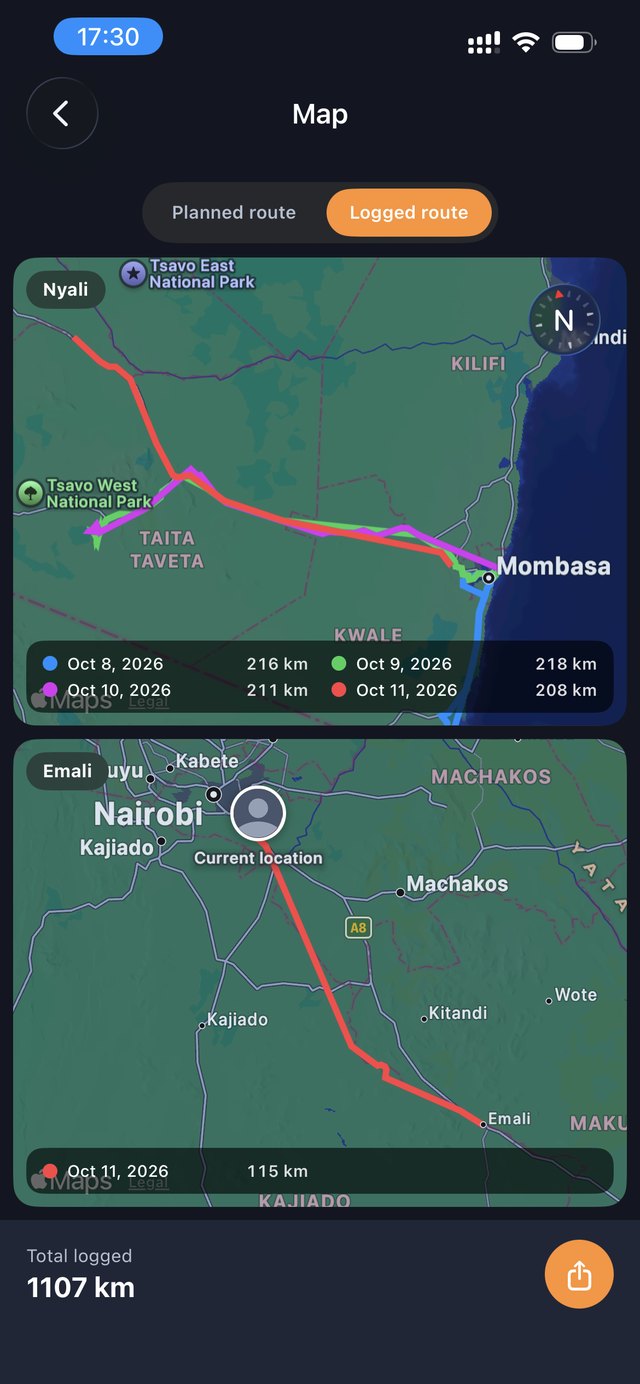
Planned route vs. logged route
Planned route
Your trip laid out on the map, stop by stop, with the total distance.
Logged route
The route you actually travelled, with the distance for each day of the trip.
Kind to your battery
Route logging only runs while a trip is actually underway, from its start date to its end date. When you stand still for a couple of minutes, logging pauses on its own, so your phone isn't tracking you while you sit in a café.
Private by design
- Your logged route is visible only to you, never to your travel companions.
- It's permanently deleted when you delete the trip or your account.
- You can switch off location access at any time in your device settings and still plan and view trips.
Your travel statistics
Every logged kilometre adds to your travel statistics: total distance, countries visited and how far along you are on your journey to the Moon.
Frequently asked questions
Does route logging drain my battery?
Logging only runs during an active trip and pauses automatically when you've been standing still for a couple of minutes.
Who can see my logged route?
Only you. Your location history is never shown to travel companions or anyone else.
Do I have to use route logging?
No, it's optional. You can plan and view trips without giving location access.